

Homelab Setup (Part 1)
I’ve long dreamed of setting up a personal home lab to mess around, host a set of local tools and my personal collection of… Linux ISOs. 💽
As I came in possession of a bunch of large SAS hard drives (spinning rust type) I started researching how to put all this to good use. So, let’s get out the Santa wish list:
🎁🎄My dream server🎄🎁
- Can plug all my disks (20+)
- Must support SAS Drives
- Must support various disk sizes (3 TB to 10 TB)
- Can lose 1 disk (Spinning rust is temporary, Data should be forever)
- Can Host VMs/Containers
- Native support for SSD cache/Hot Tier
- Pretty Web Interface (Optional)
With this in mind, let’s go through a couple of options I weighed.
Option A: A single big server with LVM

How weird is it that there is no official LVM logo…
Simplest of the options, just plug everything onto a chassis, dump all disks into an LVM volume group and call it a day, right? Well, to plug everything in a single server would require a couple of HBA cards and either a large server chassis (I still have the distant dream of owning a Storinator one day) or a custom single chassis with a couple of extensions.
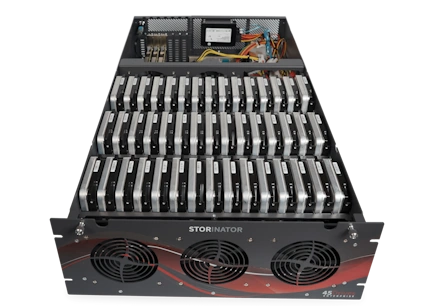
Look at this beauty
Also, while LVM is good at aggregating various disks (it’s even its main usage if you ask me), it isn’t a redundancy technology, so it’s not fitting requirements nb 4) as a single volume loss puts all the data in shambles. You can then use some mdadm to put a raid under it, but then it’s requirement nb 3) that becomes troublesome. As mdadm is a software RAID, it only applies RAID replication type, which basically requires all physical volumes to be of the same size. Add to that the egregiously long rebuild time when a disk goes down, well… surely there is something better?
Option B: A single big server with ZFS

I’m not a big ZFS connoisseur as I never deployed it fully myself, but I know of its reputation and long running record of being the underlying storage of many appliances for 10+ years. However, by checking on it, I found it lacking in a couple of categories, including a lack of hot tiering or various disk size proper usage. I also didn’t find a good management interface for it, so, while I’m not averse to CLI, I also like to have a clean web interface. Surely there is something better?
Option C: A single big server with BTRFS

I only knew BTRFS by reputation and, well, it’s not the most liked filesystem out there. From what I read, most of it comes from its introduction a decade ago, so I was willing to give it its fair chance. However, it seems to include a lot of gotchas on the redundancy part where you can screw your data pool quite easily. Also, while you can do hot tiering with other pools, it involves some custom config and usage of other tools like bcache. As far as I understood it, it seems to be used as underlying tech for some NAS appliances, including Synology, speaking of which… there has to be something better, right?
Option D: A single big Synology NAS

Many of you may know of Synology, a NAS company known as pretty much top tier for the last couple of decades. They build a, honestly, pretty good “OS” for their NAS. I bought one nearly 10 years ago and it’s still (mostly) running, and running also a pretty recent version. However, they had a (well deserved) bad press/controversy recently as they tried to impose the usage of only Synology branded or certified disks. As you can guess, people were outraged and I’m not even sure at the time I’m writing that they have fully walked back on that. Separately, I had some issues related to my requirement nb 2), as most of my drives were SAS, and the base models supported only SATA drives. Also, as requirement nb 1), to put most of my disks to use, I would have needed to go up to some mid-size to enterprise-grade models, which are… not cheap. For example, a SAS compatible 12 bay 2U is nearly 9.000€, Yikes! Please tell me there is something better…
At this point, I started to realize I needed probably multiple nodes/chassis to host properly all my drives and give me the expandability I would like.
Option E: A cluster of Ceph Nodes

Ceph is a distributed storage system. I had it pop on my radar a few years back but had to quickly dismiss it as, if I used it, I would have only a storage pool offered, and not a fully fledged virtualization platform. There must be something better… right?
Option F: A cluster of Hyper-V Nodes

Ah, good old Hyper-V. While not the most popular virtualization platform, it has grown over the years to a steady workhorse and does include some hyperconverged functionality now, well, Windows does. Microsoft introduced ReFS a few years back, basically their own take on a modern replicated file system. It has suffered like all its Linux brethren at birth of horrendous crashes and instability, creating a reputation of “not prod ready” file system in the collective sysadmin mind. While BTRFS seems to have outgrown its issues, ReFS is still young for a filesystem and recent horror stories can still be found quite easily. OK at this point there HAS to be something better…
Option G: A cluster of Nutanix nodes

And finally, there was something better. Then it hit me, I’m a freaking Nutanix Certified Master, of course I could use Nutanix, it even has a community license. I would be limited to a 4-node cluster, but I can live with that, and while there is a theoretical limit of 4 disks per node, I know for a fact it currently isn’t enforced. I would also have at my disposal the full force of Nutanix Distributed Storage fabric which would autotier data extent groups (basically a few MB of data), which is a nice feature for VM disks to not hot tier the full disk when only a few GB might be accessed regularly. On the cache side, it also provides in-RAM read cache which would improve my file access times, the best kind of thing for a NAS type.
Now that we have a winner, let’s find the parts! Stay tuned for Part 2!